
How Do You Write Better AI Image Prompts?
Writing effective AI prompts is less about finding magical keywords and more about communicating visual ideas clearly. The strongest prompts guide composition, mood, lighting, and subject relationships without becoming unnecessarily complicated. Instead of treating prompt writing as trial and error, think of it as visual direction. Every detail you include should move the image closer to your goal. Once you understand how AI interprets descriptions, creating consistent, high-quality artwork becomes much easier.
Build Prompts Like a Creative Brief
Begin With the Main Subject
Strong prompts always start with the most important element. Whether you are creating a portrait, product shot, landscape, or illustration, identify the central subject before adding artistic details. This helps the AI organize visual priorities naturally. Rather than writing a long collection of unrelated adjectives, describe who or what appears first, followed by the environment and the interaction between them. A product resting on a wooden table beside a window creates a much clearer mental picture than listing objects randomly. This structured approach also makes later revisions much easier because every new detail supports the original creative direction instead of competing with it.
Layer Visual Details With Purpose
After defining the subject, begin shaping the atmosphere. Lighting, color palette, camera angle, artistic style, composition, and background all influence the final result. Each description should answer a visual question. Is the light warm or cool? Is the scene dramatic or peaceful? Is the viewpoint close or distant? Instead of overwhelming the model with every possible adjective, choose details that reinforce one consistent visual idea. When creators approach prompts this way, the AI has fewer conflicting instructions and produces more coherent images. A carefully organized prompt almost always performs better than an extremely long one filled with repetitive modifiers.
References Can Say What Words Cannot
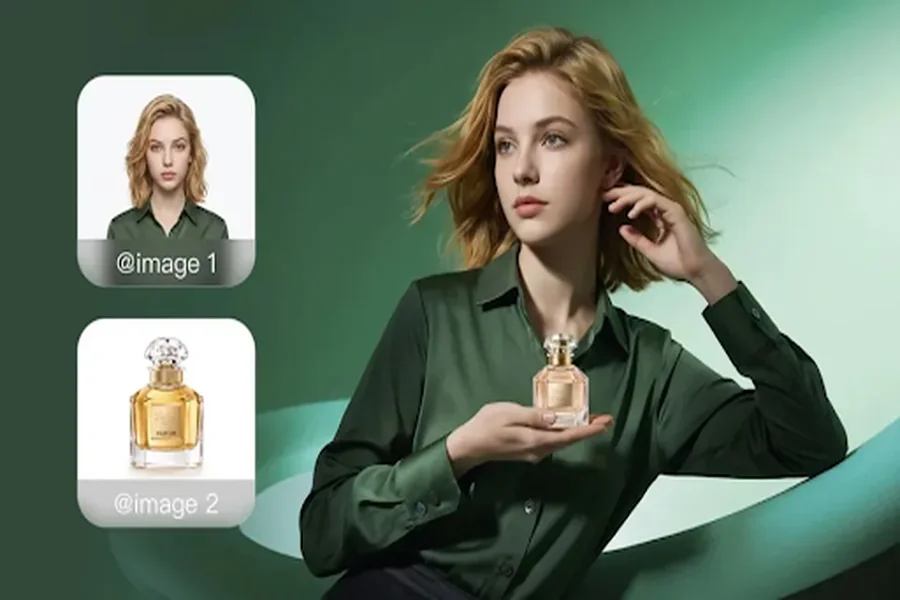
Some visual characteristics remain difficult to describe precisely. Product shapes, character appearances, brand colors, and composition layouts often benefit from reference images rather than additional text. Instead of forcing lengthy explanations, creators can combine written prompts with visual examples. This makes image generator workflows significantly more predictable. Kling AI supports both prompt-based creation and optional image references. Users may upload references for characters, products, materials, color palettes, composition, or artistic style, allowing IMAGE 3.0 to preserve defining visual characteristics while still following new creative instructions. The combination of text and references often creates more reliable results than relying on either method alone.
Refine Instead of Restarting
Treat Every Result as a Draft
Professional designers rarely expect perfection from the first attempt, and AI image creation follows the same principle. The initial output should become a starting point for improvement rather than the final destination. Instead of rewriting the entire prompt after every generation, identify exactly what should change. Perhaps the lighting needs more contrast, the camera angle should move lower, or the background requires fewer distractions. Small, focused adjustments usually produce stronger progress than replacing every instruction at once. This method also teaches creators which prompt elements influence specific visual changes, improving future prompt writing through practical experience.
Keep Consistency Across Multiple Images
Many creative projects extend beyond a single illustration. Marketing campaigns, comics, product launches, and storyboards often require a sequence of related images that share the same visual identity. Maintaining consistent characters, compositions, colors, and artistic style becomes one of the biggest creative challenges. Kling AI addresses this by supporting professional image series through IMAGE 3.0 Omni. Rather than treating every generation as an isolated task, creators can develop cohesive visual projects featuring intentional shot progression, varied framing, unified creative direction, and native 4K output. This allows prompt writing to evolve from describing one picture into directing an entire visual narrative.
Match Prompts to Your Creative Workflow
Good prompts should fit naturally into the entire production process instead of ending after one image appears. Many projects continue into animation, product presentations, story development, or social media content. Kling AI supports this broader workflow through tools including Image to Video, Text to Video, Digital Human, Restyle, Omni, and Text to Image. After generating an image, creators can continue building on their work instead of beginning a separate process elsewhere. Thinking ahead while writing prompts often produces stronger assets because each image already supports the next stage of the creative project rather than standing alone.
Conclusion
Better AI prompts come from better visual thinking, not longer descriptions. Start with a clear subject, add purposeful creative details, refine specific elements instead of rewriting everything, and use references whenever visual precision matters. As projects become more ambitious, consistency across multiple images becomes just as important as image quality itself. By combining structured prompt writing with flexible creative tools, creators spend less time guessing and more time turning ideas into polished visual content that reflects their original vision.