
Remote work security tips every small business needs
Remote work security for a small business comes down to a few habits: keep company devices updated and protected, require strong sign-ins backed by multi-factor authentication, give each person access only to the systems they actually need, and train staff to spot scams. None of this requires an in-house IT department. The tips below cover what matters most and how to put each one in place.
Why remote work creates new security risks for small businesses
Remote work spreads a company’s data across home networks, personal devices, and public Wi-Fi, and every one of those is harder to control than an office. In an office, staff sit behind one managed network and one locked door. Once people work from home or a café, that boundary disappears, and the business has to protect data it can no longer see.
Small businesses feel this more than large ones because they rarely have a security team watching for problems. A single reused password or an unlocked laptop can expose customer records, invoices, or internal systems. Attackers know smaller companies are often the softer target, which is why phishing and account takeovers hit them regularly. Remote work is not dangerous on its own. The habits built for an office stop working once staff leave the building.
How to secure the devices employees use outside the office
Start by making sure every device that touches company data is updated, protected, and traceable. A laptop running old software or missing antivirus is the easiest way for someone to get in, and it’s also the cheapest problem to fix.
A few basics cover most of the risk. Turn on automatic operating-system and browser updates so known holes get patched without anyone thinking about it. Install reputable antivirus or endpoint protection on every work machine. Require screen locks and full-disk encryption, which are built into Windows and macOS, so a lost laptop doesn’t hand over its files. If staff use personal phones or computers for work, set a simple written policy on what’s allowed and keep work data in company accounts rather than personal ones. These steps are quick, but they close the gaps attackers rely on most.
What is the safest way to give remote staff access to internal systems
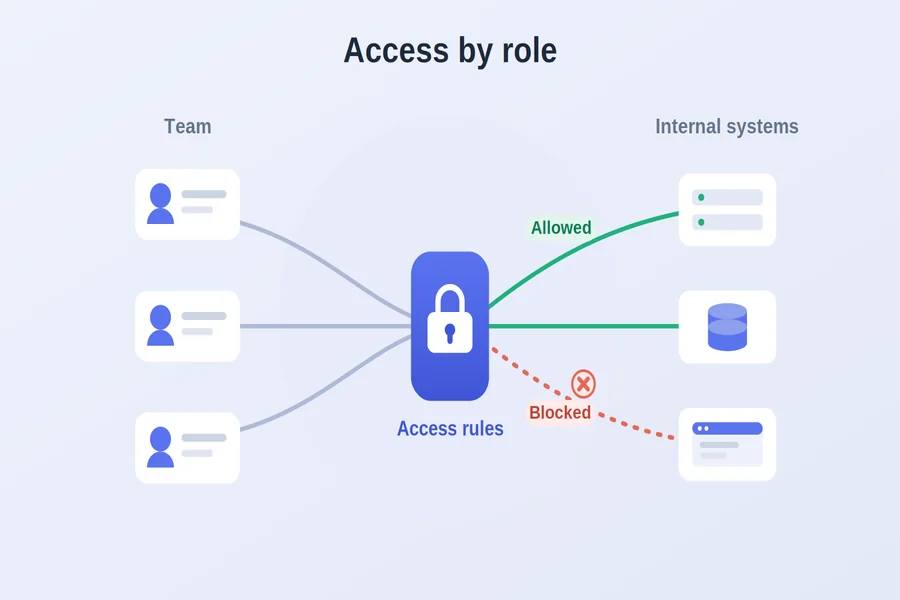
The safest approach is to give each employee access only to the specific systems they need, rather than opening the whole network to everyone who logs in. Broad access is convenient, but it means one compromised account can reach everything. Narrowing access limits the damage when something goes wrong.
Here’s a practical way to set it up:
- List what people actually need. Map each role to the systems and communication tools they use, such as a CRM, file server, accounting platform, or team messaging app, and ignore the rest.the rest.
- Choose how remote staff will connect. Some businesses use a traditional business VPN, others hand this to a managed IT provider, and others rely on a dedicated corporate network platform such as MXP to grant access by rules and manage permissions from one dashboard.
- Grant access by team, not by individual. Assigning access to roles or teams makes it far easier to add someone new or remove them later.
- Keep a log of who signed in. A record of sign-ins with dates and locations helps you spot anything unusual.
Making access deliberate means you can see exactly who can reach what, and cut it off the moment you need to.
Why multi-factor authentication matters for remote teams
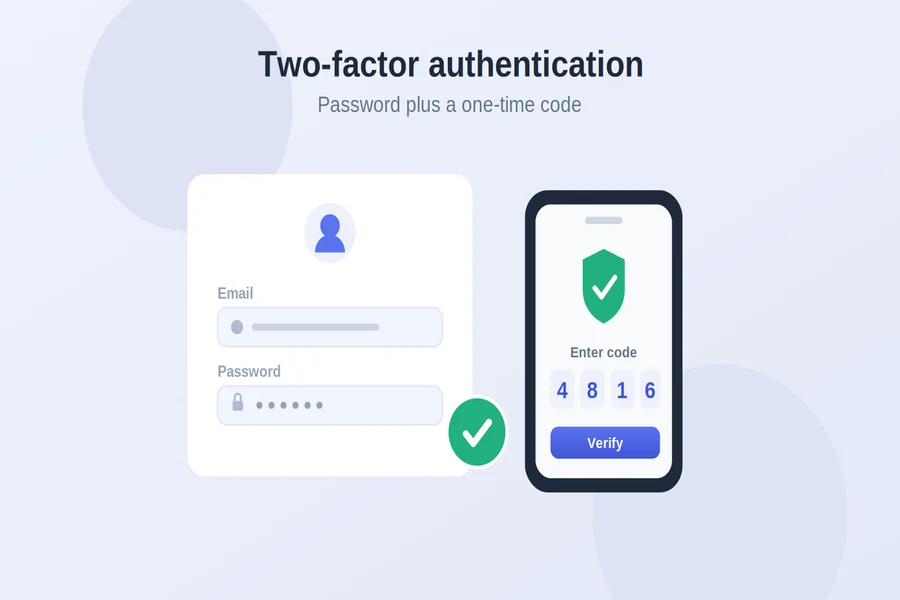
Multi-factor authentication matters because passwords alone are no longer enough to keep accounts safe. Even a strong password can be stolen through phishing, a data breach, or a lucky guess, and once it’s out, an attacker can log in from anywhere. Requiring a second factor stops most of those attempts cold.
Multi-factor authentication asks for something beyond the password, like a code from an app, a text, or a hardware key, so a stolen password isn’t enough on its own. Turn it on for email, file storage, accounting, and any system that holds customer or financial data. Authenticator apps and hardware keys are more resistant to phishing than text-message codes, so prefer them where the option exists. It’s one of the highest-impact changes a small business can make, and most services include it at no extra cost.
Common remote work security mistakes to avoid
The most common mistake is treating remote security as a one-time setup rather than something you maintain. Access that made sense a year ago often lingers long after a project ends or a person leaves, and unused accounts are easy to forget and easy to exploit.
Watch out for a few others. Letting former employees keep access after they leave is a frequent and serious gap — access should be revoked on their last day, not weeks later. Sharing one login across a team removes any way to tell who did what. Skipping updates because they’re inconvenient leaves known holes open. Relying only on email codes for authentication is better than nothing but weaker than an app. And assuming staff already know how to spot a phishing message, without ever training them, leaves the human side unguarded.
Best practices for securing a remote workforce
A short checklist to keep the team secure without adding overhead:
- Keep every work device updated, encrypted, and running endpoint protection.
- Turn on multi-factor authentication everywhere, preferring an app or hardware key over text codes.
- Give each person access only to the systems their role requires.
- Revoke access the day someone leaves, and review who has access every few months.
- Train staff to recognize phishing and to report anything suspicious quickly.
FAQ
What is remote work security? Remote work security is the set of practices that protect company data, devices, and systems when employees work outside the office. It covers device protection, secure sign-ins, controlled access to internal systems, and staff awareness. The goal is to keep company information safe across home networks and personal devices.
How can a small business improve remote work security on a limited budget? Focus on the changes that cost little and prevent the most damage: automatic updates, multi-factor authentication, and limiting each person’s access to what they need. Most of these features are already built into the tools a business uses. Staff training on phishing is free and stops many attacks before they start.
Is a VPN enough to keep remote workers secure? A VPN encrypts the connection, but on its own it often grants broad access to the whole network once someone logs in. It works better alongside multi-factor authentication and access rules that limit what each person can reach. Many businesses now pair or replace a VPN with a platform that grants access by role.
How do you give remote employees access to internal systems safely? Grant access by role or team so each person reaches only the systems they need, and require multi-factor authentication to log in. Keep a log of sign-ins so unusual activity is visible. Review access regularly and remove it as soon as someone changes roles or leaves.
What should be done when a remote employee leaves the company? Revoke access to every company system, account, and file on their last day, not later. Change any shared passwords they knew and recover company devices. A written offboarding checklist keeps these steps from being missed under time pressure.
Why is multi-factor authentication recommended for remote teams? Because passwords are regularly stolen through phishing and breaches, and a password alone lets an attacker log in from anywhere. A second factor, such as an app code or hardware key, blocks most of those attempts. It’s one of the cheapest and most effective protections a small business can add.